


TCP/IP Protocol
This is the description of the TCP/IP protocol for the Brick Daemon and the WIFI/Ethernet Extensions.
An overview of products that are controllable over TCP/IP can be found here.
Protocol
The TCP/IP protocol is modeled after the concept of a function call. A request packet is send to the stack to trigger the execution of a function on a selected Brick or Bricklet. Functions that return something send a response packet back containing the return value(s). Functions that return nothing don't send a response packet back to the host. Beside normal functions there are also callbacks. Bricks and Bricklets can send response packets spontaneously back to the host to notify about an event or specific condition.
Packet Layout
The TCP/IP protocol is based on packets transfered between host and stack. Each packet starts with a 8 byte header followed by a payload of variable length. The header consists of:
UID as uint32 (4 byte),
Packet length as uint8 (1 byte),
Function ID as uint8 (1 bytes),
Sequence number and Options as uint8 (1 byte) and
Flags as uint8 (1 byte)
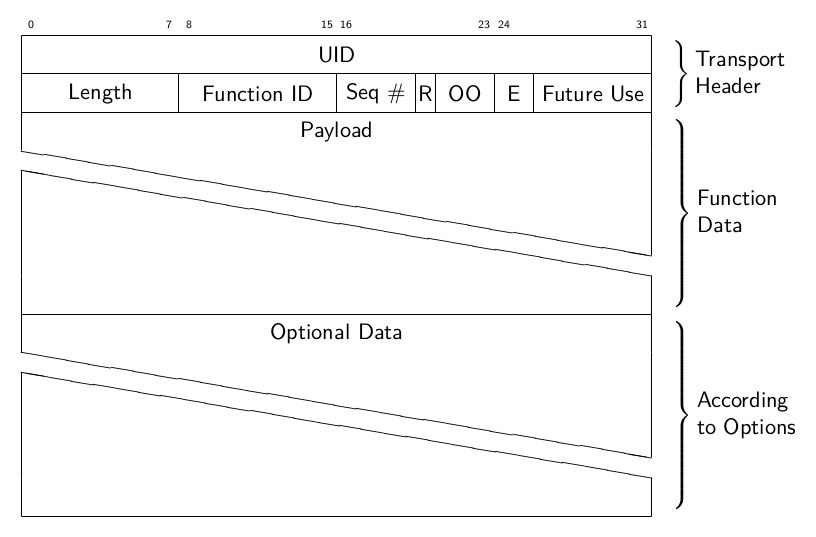
The UID is the unique identifier that is given to every Brick and Bricklet. In the API bindings the UID is used in Base58 encoded form using this alphabet:
123456789abcdefghijkmnopqrstuvwxyzABCDEFGHJKLMNPQRSTUVWXYZ
The packet length specifies the length of the complete packet (header and payload) in bytes. A packet without a payload has a packet length of 8. The function ID combined with the transfer direction defines the content of the payload and this determines the packet length.
In a request packet the function ID specifies which function to execute on the device specified by the UID. In a response packet the function ID specifies from which function or callback the packet was send.
The sequence number is incremented with every packet send. The answer from a Brick/Bricklet has the same sequence number. Since the Bricks/Bricklets currently guarantee that packets are answered in the correct order, this is not strictly needed. However, we can't rule out the possibility that there will be a Brick in the future that has a processor that is capable of real multitasking.
For callbacks the sequence number is always 0 and this value is not allowed for other packets. Non-callback packets can only use 1 - 15 as sequence number. This allows to distinguish callback packets from other packets.
Options:
Response Expected (1 bit): This bit is set to 1, if the packet should be answered. This has two advantages: First, the routing table can be constructed more efficiently, since it is known if there is an answer to a packet or not. Second, it is possible to receive an answer for a "setter". If you call a setter such as
setPosition, there is normally no answer from a Brick and the call does not block. This means, that it is possible to spam the Bricks with more messages then they can swallow. With the R flag it is possible to turn blocking setters on. Additionally, the R option can be used together with the E flag, see below.Other Options (3 bit): Three currently unused options, for future use.
Flags:
Error Code (2 bit): This number can be set by a Brick or Bricklet in an answer message to a function call. If it is different from zero it means that an error occurred.
0: OK
1: Invalid parameter (index out-of-range or similar)
2: Function not supported
Value 3 is not used yet
Future Use (6 bit): Six possible flags for future use.
All data is represented in little endian. A bool value is represented by 1 byte; 0 is false, all other values are true. A float value is represented by 4 bytes in IEEE 754 format. A char value is represented by 1 byte in ASCII encoding.
A fixed size char array represents a string. If the string is shorter than the capacity of the array then the remaining space is filled with 0. In this case the contained string is null-terminated. In case that the string fills the whole array no null-terminator can be appended and the string is not null-terminated. Therefore, you cannot rely on strings being null-terminated.
Function Calls
When the UID of a device is known its specific functions can be called.
To do this you need to send a corresponding request packet. The UID
specifies the destination of the request packet and also affects the meaning
of the function ID. This is because the same function ID has different meanings
for different Bricks and Bricklets. For example, function ID 1 maps to the
get_stack_voltage function on the
Master Brick and to the set_port function on the
IO-16 Bricklet.
The following example shows how to call the
get_humidity function of a Humidity
Bricklet with UID "b1Q" (Base58) or 33688 (integer). The corresponding
request packet has
UID 33688 as uint32 (0x98 0x83 0x00 0x00),
Packet length 8 as uint8 (0x08),
Function ID 1 as uint8 (0x01),
Sequence number 1 and response expected 1 as uint8 (0x18) and
Flags 0 as uint8 (0x00).
and an empty payload. Its hex dump looks like this:
0000 98 83 00 00 08 01 18 00 .. ......
The corresponding response packet can be identified by the UID, the function ID and the sequence number as they will have the same values as the request packet. The response packet has
UID 33688 as uint32 (0x98 0x83 0x00 0x00),
Packet length 10 as uint8 (0x0a),
Function ID 1 as uint8 (0x01),
Sequence number 1 and response expected 1 as uint8 (0x18) and
Flags 0 as uint8 (0x00).
The payload contains the
humidity 421 as uint16 (0xa5 0x01).
A humidity value of 421 means 42.1 %RH and is just an example. The hex dump of the packet looks like this:
0000 98 83 00 00 0a 01 18 00 a5 01 ..........
If there is no device with the given UID then the request is ignored and no response is send at all. This means that you should wait for a response packet only for a certain amount of time. The recommended timeout is 2500ms. After this amount of time you can assume that there is no device with the given UID.
There are also specific functions that do not send a response packet under
normal conditions, for example the set_state
function of the Dual Relay Bricklet
(assuming the response expected flag is not set).
Callbacks
Devices can send response packets spontaneously back to the host to notify about an event or specific condition.
Most callbacks are disabled by default and have to enabled first.
For example, the CALLBACK_MAGNETIC_FIELD
callback of the IMU Brick with UID 6wVE7W (3631747890 as integer) can be enabled
with a call to BrickIMU.set_magnetic_field_period() with a period larger 0.
Afterwards you will periodically receive response packets with
UID 3631747890 as uint32 (0x32 0x13 0x78 0xd8),
Packet length 14 as uint8 (0x0e),
Function ID 32 as uint8 (0x20),
Sequence number 0 and response expected 1 as uint8 (0x08)
Flags 0 as uint8 (0x00)
The payload contains
x -239 as int16 (0x11 0xff),
y 60 as int16 (0x3c 0x00) and
z -223 as int16 (0x21 0xff)
representing the magnetic field and is just an example. The hex dump of the packet looks like this:
0000 32 13 78 d8 0e 20 08 00 11 ff 3c 00 21 ff 2.x.. ....<.!.
As callbacks are spontaneously triggered you can receive their response packet at any time. For example between sending a request packet and receiving the corresponding response packet.
Note
Using callbacks for recurring events is always preferred compared to using getters. It will use less USB bandwidth and the latency will be a lot better, since there is no round-trip time.
Authentication Handshake
Support for authentication was added in Brick Daemon version 2.1.0 and Master Brick firmware version 2.2.0 for the Ethernet and WIFI Extensions.
With authentication enabled each TCP/IP connection starts in non-authenticated state. Before any normal communication can occur an authentication handshake has to be performed successfully to switch the connection to authenticated state. This handshake uses the server/client nonce approach utilizing HMAC-SHA1.
The server side of the handshake is handled by the manager of the TCP/IP
connection. This can either be a Brick Daemon or a Master Brick with a
Ethernet or WIFI Extension. For this the manager of the TCP/IP connection
(the server) got its own UID 2 (1 as integer) so it can receive function
calls: get_authentication_nonce() and authenticate().
The handshake is initiated by the client (e.g. API bindings or Brick Viewer)
calling the get_authentication_nonce() function to receive the 4 byte
Server nonce 0x50 0xc0 0x29 0xd1.
Then the client generates a 4 byte
Client nonce 0xdc 0x42 0x57 0x4d
that it concatenates to the server nonce to form the
Full nonce 0x50 0xc0 0x29 0xd1 0xdc 0x42 0x57 0x4d.
Next the client uses the
Authentication secret
My Authentication Secret!
as key to calculate the 20 byte
HMAC-SHA1 digest 0x61 0x3d 0x62 0xec 0x24 0x6e 0xeb 0xe3 0x08 0xf7 0x95 0x60 0x56 0x0d 0xa7 0xee 0x29 0x06 0x40 0x01
of the final nonce. The digest is then send to the server along with the
client nonce by calling the authenticate() function.
The server receives client nonce and digest and does the same calculations as
the client did. If the server calculates the same digest as provided by the
client then client and server used the same secret. In this case the connection
is switched to authenticated state and the client can proceed with normal
communication. If the digests don't match the client used a mismatching
authentication secret and the server closes the connection.
API
The API is split in several categories. The Brick Daemon functions currently deal with authentication. The broadcast functions are send to all devices and the callbacks are send back by the devices.
Brick Daemon Functions
Support for authentication was added in
Brick Daemon version 2.1.0 and Master Brick firmware version 2.2.0 for the
Ethernet and WIFI Extensions. Authentication is done per-connection. For this
Brick Daemon got its own UID 2 (1 as integer) as the manager of the
TCP/IP connection.
- get_authentication_nonce
- Function ID:
1
- Request:
empty payload
- Response:
server_nonce -- uint8[4]
This is the first function used in the authentication handshake. It asks the manager of the TCP/IP connection for the server authentication nonce.
- authenticate
- Function ID:
2
- Request:
client_nonce -- uint8[4]
digest -- uint8[20]
- Response:
no response
This is the second function used in the authentication handshake. It sends the client nonce and the HMAC-SHA1 digest to the manager of the TCP/IP connection. If the handshake succeeds the connection switches from non-authenticated to authenticated state and communication can continue as normal. If the handshake fails then the connection gets closed.
Broadcast Functions
The following functions are supported by all devices. The UID in the packet
header has to be set to 1 (0 as integer) for broadcast.
- disconnect_probe
- Function ID:
128
- Request:
empty payload
- Response:
no response
Should be send periodically to the WIFI Extenstion to improve the detection of Wi-Fi disconnects. Without this a disconnect of the WIFI Extension might no be detected at all due to the way TCP/IP works.
The API bindings send a disconnect probe if there was no other packet send or received for at least 5s. Bricks and Bricklets just ignore this function ID.
As this feature is only useful for the WIFI Extension the Brick Daemon just drops incoming packets with this function ID and does not forward them over USB.
- enumerate
- Function ID:
254
- Request:
empty payload
- Response:
no response
Triggers the
CALLBACK_ENUMERATE()callback for all devices currently connected to the Brick Daemon.Use this function to enumerate all connected devices without the need to know their UIDs beforehand.
General Callbacks
- CALLBACK_FORCED_ACK
- Function ID:
0
- Response:
empty payload
The WIFI Extenstion can send this callback to affect the TCP/IP buffer handling of clients. This can improve the handling of request packets on the client side.
This feature is internal and bindings should just drop incoming packets with this function ID.
- CALLBACK_ENUMERATE
- Function ID:
253
- Response:
uid -- char[8]
connected_uid -- char[8]
position -- char
hardware_version -- uint8[3]
firmware_version -- uint8[3]
device_identifier -- uint16
enumeration_type -- uint8
The callback has seven parameters:
uid: The UID of the device.connected_uid: UID where the device is connected to. For a Bricklet this is the UID of the Brick or Bricklet it is connected to. For a Brick it is the UID of the bottommost Brick in the stack. For the bottommost Brick in a stack it is "0". With this information it is possible to reconstruct the complete network topology.position: For Bricks: '0' - '8' (position in stack). For Bricklets: 'a' - 'h' (position on Brick) or 'i' (position of the Raspberry Pi (Zero) HAT) or 'z' (Bricklet on Isolator Bricklet).hardware_version: Major, minor and release number for hardware version.firmware_version: Major, minor and release number for firmware version.device_identifier: A number that represents the device.enumeration_type: Type of enumeration.
Possible enumeration types are:
0: Device is available (enumeration triggered by user).
1: Device is newly connected (automatically send by Brick after establishing a communication connection). This indicates that the device has potentially lost its previous configuration and needs to be reconfigured.
2: Device is disconnected (only possible for USB connection). In this case only
uidandenumeration_typeare valid.
It should be possible to implement plug-and-play functionality with this (as is done in Brick Viewer).
The device identifier numbers can be found here.
Bricks and Bricklets
Links to the API reference for Bricks and Bricklets are listed in the following table. Further project descriptions can be found in the Kits section.
API |
|
|---|---|
Bricks |
|
Bricklets |
|