


- Getting Started
- Hardware
- Software
- Brick Daemon (brickd)
- Brick Viewer (brickv)
- Brick Logger
- API Bindings
- C/C++
- C/C++ (iOS)
- C/C++ for Microcontrollers
- C#
- C# (Windows Phone)
- Delphi/Lazarus
- Go
- Java
- Java (Android)
- JavaScript
- LabVIEW
- Mathematica
- MATLAB/Octave
- MQTT
- openHAB
- Perl
- PHP
- Python
- Ruby
- Requirements
- Installation
- Testing an Example
- API Reference and Examples
- IP Connection
- Bricks
- Bricks (Discontinued)
- Bricklets
- Accelerometer Bricklet 2.0
- Air Quality Bricklet
- Ambient Light Bricklet 3.0
- Analog In Bricklet 3.0
- Analog Out Bricklet 3.0
- Barometer Bricklet
- Barometer Bricklet 2.0
- CAN Bricklet
- CAN Bricklet 2.0
- CO2 Bricklet 2.0
- Color Bricklet
- Color Bricklet 2.0
- Compass Bricklet
- DC Bricklet 2.0
- Distance IR Bricklet
- Distance IR Bricklet 2.0
- Distance US Bricklet 2.0
- DMX Bricklet
- Dual Button Bricklet 2.0
- Dust Detector Bricklet
- E-Paper 296x128 Bricklet
- Energy Monitor Bricklet
- GPS Bricklet 2.0
- GPS Bricklet 3.0
- Hall Effect Bricklet
- Hall Effect Bricklet 2.0
- Humidity Bricklet 2.0
- IMU Bricklet 3.0
- Industrial Analog Out Bricklet 2.0
- Industrial Counter Bricklet
- Industrial Digital In 4 Bricklet 2.0
- Industrial Digital Out 4 Bricklet
- Industrial Digital Out 4 Bricklet 2.0
- Industrial Dual 0-20mA Bricklet
- Industrial Dual 0-20mA Bricklet 2.0
- Industrial Dual AC In Bricklet
- Industrial Dual AC Relay Bricklet
- Industrial Dual Analog In Bricklet 2.0
- Industrial Dual Relay Bricklet
- Industrial PTC Bricklet
- Industrial Quad Relay Bricklet 2.0
- IO-16 Bricklet
- IO-16 Bricklet 2.0
- IO-4 Bricklet 2.0
- Isolator Bricklet
- Joystick Bricklet
- Joystick Bricklet 2.0
- Laser Range Finder Bricklet 2.0
- LCD 128x64 Bricklet
- LCD 20x4 Bricklet
- LED Strip Bricklet 2.0
- Line Bricklet
- Linear Poti Bricklet
- Linear Poti Bricklet 2.0
- Load Cell Bricklet 2.0
- Motion Detector Bricklet 2.0
- Motorized Linear Poti Bricklet
- Multi Touch Bricklet
- Multi Touch Bricklet 2.0
- NFC Bricklet
- OLED 128x64 Bricklet 2.0
- OLED 64x48 Bricklet
- One Wire Bricklet
- Outdoor Weather Bricklet
- Particulate Matter Bricklet
- Performance DC Bricklet
- Piezo Speaker Bricklet
- Piezo Speaker Bricklet 2.0
- Real-Time Clock Bricklet
- Real-Time Clock Bricklet 2.0
- Remote Switch Bricklet 2.0
- RGB LED Bricklet 2.0
- RGB LED Button Bricklet
- Rotary Encoder Bricklet 2.0
- Rotary Poti Bricklet
- Rotary Poti Bricklet 2.0
- RS232 Bricklet
- RS232 Bricklet 2.0
- RS485 Bricklet
- Segment Display 4x7 Bricklet
- Segment Display 4x7 Bricklet 2.0
- Servo Bricklet 2.0
- Silent Stepper Bricklet 2.0
- Solid State Relay Bricklet 2.0
- Sound Intensity Bricklet
- Sound Pressure Level Bricklet
- Temperature Bricklet
- Temperature Bricklet 2.0
- Temperature IR Bricklet 2.0
- Thermal Imaging Bricklet
- Thermocouple Bricklet 2.0
- Tilt Bricklet
- UV Light Bricklet 2.0
- Voltage/Current Bricklet 2.0
- XMC1400 Breakout Bricklet
- Bricklets (Discontinued)
- Rust
- Shell
- Visual Basic .NET
- ESP32 Firmware
- APT Repository
- Device Identifier
- Source Code and Bug Tracking
- Programming Interface
- Kits
- Embedded Boards
- Specifications
Ruby - Tilt Bricklet
This is the description of the Ruby API bindings for the Tilt Bricklet. General information and technical specifications for the Tilt Bricklet are summarized in its hardware description.
An installation guide for the Ruby API bindings is part of their general description.
Examples
The example code below is Public Domain (CC0 1.0).
Simple
 1#!/usr/bin/env ruby
 2# -*- ruby encoding: utf-8 -*-
 3
 4require 'tinkerforge/ip_connection'
 5require 'tinkerforge/bricklet_tilt'
 6
 7include Tinkerforge
 8
 9HOST = 'localhost'
10PORT = 4223
11UID = 'XYZ' # Change XYZ to the UID of your Tilt Bricklet
12
13ipcon = IPConnection.new # Create IP connection
14t = BrickletTilt.new UID, ipcon # Create device object
15
16ipcon.connect HOST, PORT # Connect to brickd
17# Don't use device before ipcon is connected
18
19# Get current tilt state
20state = t.get_tilt_state
21
22if state == BrickletTilt::TILT_STATE_CLOSED
23  puts "Tilt State: Closed"
24elsif state == BrickletTilt::TILT_STATE_OPEN
25  puts "Tilt State: Open"
26elsif state == BrickletTilt::TILT_STATE_CLOSED_VIBRATING
27  puts "Tilt State: Closed Vibrating"
28end
29
30puts 'Press key to exit'
31$stdin.gets
32ipcon.disconnect
Callback
Download (example_callback.rb)
 1#!/usr/bin/env ruby
 2# -*- ruby encoding: utf-8 -*-
 3
 4require 'tinkerforge/ip_connection'
 5require 'tinkerforge/bricklet_tilt'
 6
 7include Tinkerforge
 8
 9HOST = 'localhost'
10PORT = 4223
11UID = 'XYZ' # Change XYZ to the UID of your Tilt Bricklet
12
13ipcon = IPConnection.new # Create IP connection
14t = BrickletTilt.new UID, ipcon # Create device object
15
16ipcon.connect HOST, PORT # Connect to brickd
17# Don't use device before ipcon is connected
18
19# Enable tilt state callback
20t.enable_tilt_state_callback
21
22# Register tilt state callback
23t.register_callback(BrickletTilt::CALLBACK_TILT_STATE) do |state|
24  if state == BrickletTilt::TILT_STATE_CLOSED
25    puts "Tilt State: Closed"
26  elsif state == BrickletTilt::TILT_STATE_OPEN
27    puts "Tilt State: Open"
28  elsif state == BrickletTilt::TILT_STATE_CLOSED_VIBRATING
29    puts "Tilt State: Closed Vibrating"
30  end
31end
32
33puts 'Press key to exit'
34$stdin.gets
35ipcon.disconnect
API
All functions listed below are thread-safe.
Basic Functions
- BrickletTilt::new(uid, ipcon) tilt
Parameters: - uid – Type: str
- ipcon – Type: IPConnection
Returns: - tilt – Type: BrickletTilt
Creates an object with the unique device ID
uid:tilt = BrickletTilt.new 'YOUR_DEVICE_UID', ipcon
This object can then be used after the IP Connection is connected.
- BrickletTilt#get_tilt_state int
Returns: - state – Type: int, Range: See constants
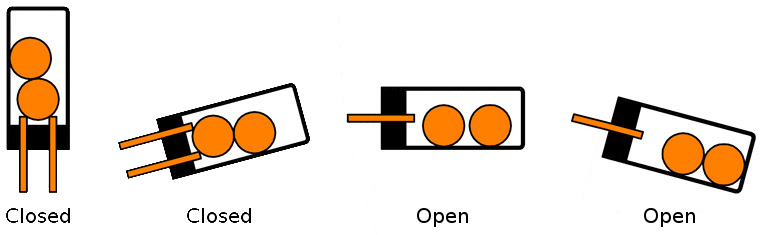
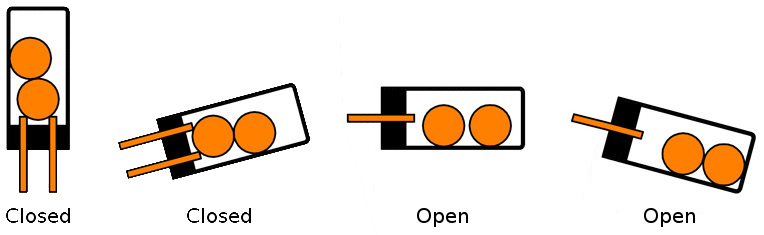
Returns the current tilt state. The state can either be
0 = Closed: The ball in the tilt switch closes the circuit.
1 = Open: The ball in the tilt switch does not close the circuit.
2 = Closed Vibrating: The tilt switch is in motion (rapid change between open and close).
The following constants are available for this function:
For state:
BrickletTilt::TILT_STATE_CLOSED = 0
BrickletTilt::TILT_STATE_OPEN = 1
BrickletTilt::TILT_STATE_CLOSED_VIBRATING = 2
Advanced Functions
- BrickletTilt#get_identity [str, str, chr, [int, ...], [int, ...], int]
Return Array: - 0: uid – Type: str, Length: up to 8
- 1: connected_uid – Type: str, Length: up to 8
- 2: position – Type: chr, Range: ['a' to 'h', 'z']
- 3: hardware_version – Type: [int, ...], Length: 3
- 0: major – Type: int, Range: [0 to 255]
- 1: minor – Type: int, Range: [0 to 255]
- 2: revision – Type: int, Range: [0 to 255]
- 4: firmware_version – Type: [int, ...], Length: 3
- 0: major – Type: int, Range: [0 to 255]
- 1: minor – Type: int, Range: [0 to 255]
- 2: revision – Type: int, Range: [0 to 255]
- 5: device_identifier – Type: int, Range: [0 to 216 - 1]
Returns the UID, the UID where the Bricklet is connected to, the position, the hardware and firmware version as well as the device identifier.
The position can be 'a', 'b', 'c', 'd', 'e', 'f', 'g' or 'h' (Bricklet Port). A Bricklet connected to an Isolator Bricklet is always at position 'z'.
The device identifier numbers can be found here. There is also a constant for the device identifier of this Bricklet.
Callback Configuration Functions
- BrickletTilt#register_callback(callback_id) { |param [, ...]| block } nil
Parameters: - callback_id – Type: int
Registers the given
blockwith the givencallback_id.The available callback IDs with corresponding function signatures are listed below.
- BrickletTilt#enable_tilt_state_callback nil
Enables the
::CALLBACK_TILT_STATEcallback.
- BrickletTilt#disable_tilt_state_callback nil
Disables the
::CALLBACK_TILT_STATEcallback.
- BrickletTilt#is_tilt_state_callback_enabled bool
Returns: - enabled – Type: bool, Default: false
Returns true if the
::CALLBACK_TILT_STATEcallback is enabled.
Callbacks
Callbacks can be registered to receive time critical or recurring data from
the device. The registration is done with the
#register_callback function of
the device object. The first parameter is the callback ID and the second
parameter is a block:
tilt.register_callback BrickletTilt::CALLBACK_EXAMPLE, do |param|
  puts "#{param}"
end
The available constants with inherent number and type of parameters are described below.
Note
Using callbacks for recurring events is always preferred compared to using getters. It will use less USB bandwidth and the latency will be a lot better, since there is no round trip time.
- BrickletTilt::CALLBACK_TILT_STATE
Callback Parameters: - state – Type: int, Range: See constants
This callback provides the current tilt state. It is called every time the state changes.
See
#get_tilt_statefor a description of the states.The following constants are available for this function:
For state:
BrickletTilt::TILT_STATE_CLOSED = 0
BrickletTilt::TILT_STATE_OPEN = 1
BrickletTilt::TILT_STATE_CLOSED_VIBRATING = 2
Virtual Functions
Virtual functions don't communicate with the device itself, but operate only on the API bindings device object. They can be called without the corresponding IP Connection object being connected.
- BrickletTilt#get_api_version [int, ...]
Return Array: - 0: api_version – Type: [int, ...], Length: 3
- 0: major – Type: int, Range: [0 to 255]
- 1: minor – Type: int, Range: [0 to 255]
- 2: revision – Type: int, Range: [0 to 255]
Returns the version of the API definition implemented by this API bindings. This is neither the release version of this API bindings nor does it tell you anything about the represented Brick or Bricklet.
- BrickletTilt#get_response_expected(function_id) bool
Parameters: - function_id – Type: int, Range: See constants
Returns: - response_expected – Type: bool
Returns the response expected flag for the function specified by the function ID parameter. It is true if the function is expected to send a response, false otherwise.
For getter functions this is enabled by default and cannot be disabled, because those functions will always send a response. For callback configuration functions it is enabled by default too, but can be disabled by
#set_response_expected. For setter functions it is disabled by default and can be enabled.Enabling the response expected flag for a setter function allows to detect timeouts and other error conditions calls of this setter as well. The device will then send a response for this purpose. If this flag is disabled for a setter function then no response is sent and errors are silently ignored, because they cannot be detected.
The following constants are available for this function:
For function_id:
BrickletTilt::FUNCTION_ENABLE_TILT_STATE_CALLBACK = 2
BrickletTilt::FUNCTION_DISABLE_TILT_STATE_CALLBACK = 3
- BrickletTilt#set_response_expected(function_id, response_expected) nil
Parameters: - function_id – Type: int, Range: See constants
- response_expected – Type: bool
Changes the response expected flag of the function specified by the function ID parameter. This flag can only be changed for setter (default value: false) and callback configuration functions (default value: true). For getter functions it is always enabled.
Enabling the response expected flag for a setter function allows to detect timeouts and other error conditions calls of this setter as well. The device will then send a response for this purpose. If this flag is disabled for a setter function then no response is sent and errors are silently ignored, because they cannot be detected.
The following constants are available for this function:
For function_id:
BrickletTilt::FUNCTION_ENABLE_TILT_STATE_CALLBACK = 2
BrickletTilt::FUNCTION_DISABLE_TILT_STATE_CALLBACK = 3
- BrickletTilt#set_response_expected_all(response_expected) nil
Parameters: - response_expected – Type: bool
Changes the response expected flag for all setter and callback configuration functions of this device at once.
Constants
- BrickletTilt::DEVICE_IDENTIFIER
This constant is used to identify a Tilt Bricklet.
The
#get_identity()function and theIPConnection::CALLBACK_ENUMERATEcallback of the IP Connection have adevice_identifierparameter to specify the Brick's or Bricklet's type.
- BrickletTilt::DEVICE_DISPLAY_NAME
This constant represents the human readable name of a Tilt Bricklet.