


- Getting Started
- Hardware
- Software
- Brick Daemon (brickd)
- Brick Viewer (brickv)
- Brick Logger
- API Bindings
- ESP32 Firmware
- APT Repository
- Device Identifier
- Source Code and Bug Tracking
- Programming Interface
- Kits
- Embedded Boards
- Specifications
LabVIEW - API Bindings
The LabVIEW bindings allow you to control Bricks and Bricklets from your LabVIEW programs. The ZIP file for the bindings contains:
net20/Tinkerforge.dll, a precompiled .NET 2.0 librarynet40/Tinkerforge.dll, a precompiled .NET 4.0 libraryin
source/the source code ofTinkerforge.dllin
examples/the examples for every Brick and Bricklet in LabVIEW 2010 and LabVIEW 2013 format
The LabVIEW bindings are based on the C# bindings. Since version 2.0.0 the C# bindings are CLS compliant. This allows to use them with all .NET compatible languages, such as LabVIEW's .NET support.
Requirements
LabVIEW on Windows with .NET support
Installation
To make the bindings work LabVIEW has to be able to find the Tinkerforge.dll.
The easiest option is to put the Tinkerforge.dll in the LabVIEW
installation folder. For example, the default installation folder for LabVIEW
2015 is:
C:\Program Files\National Instruments\LabVIEW 2015\
The Tinkerforge.dll can also be put in the same folder as the .vi file that
is going to use it. In both cases LabVIEW should automatically find the
Tinkerforge.dll.
The ZIP file for the bindings contains two different versions of the
Tinkerforge.dll:
For LabVIEW 2011 and older LabVIEW versions the
Tinkerforge.dllfrom thenet20folder should be used.For LabVIEW 2012 and newer LabVIEW versions the
Tinkerforge.dllfrom thenet40folder should be used.
Warnings
LabVIEW might warn that the Tinkerforge.dll was loaded from a different
folder. This warning can be ignored.
LabVIEW might also warn that it found a Tinkerforge.dll with a different
version. If the found version is newer than the one LabVIEW was locking for,
then you can ignore this warning. Otherwise you should update the LabVIEW
bindings.
Errors
If LabVIEW reports error code 1386 "The specified .NET class is not available in LabVIEW." then make sure that all ".NET Constructor" nodes in the .vi file are configured correctly. Double click on a ".NET Constructor" node and select "Tinkerforge" as the "Assembly".
If the "Select .NET Assembly" dialog says "An error occurred trying to load the
assembly", then check in Windows Explorer if the Tinkerforge.dll is marked
as coming from another computer. If this is the case LabVIEW will refuse to
load it.
Open the properties dialog of the Tinkerforge.dll in Windows Explorer. If
there is an "Unblock" button at the bottom of the "General" page, then the
file is blocked. Click the "Unblock" button and restart LabVIEW. The problem
should be fixed now.
Testing an Example
To test a LabVIEW example Brick Daemon and Brick Viewer have to be installed first. Brick Daemon acts as a proxy between the USB interface of the Bricks and the API bindings. Brick Viewer connects to Brick Daemon and helps to figure out basic information about the connected Bricks and Bricklets.
Stepper Brick
As an example let's run the configuration example for the Stepper Brick. For
this we copy the Example Configuration.vi file from the
examples/Brick/Stepper/ folder into a new folder:
example_project/
 -> Example Configuration.vi
If you did not copy the Tinkerforge.dll to the installation folder of
your LabVIEW installation then the Tinkerforge.dll file has to be copied to
the example_project/ folder as well before the example can be opened in
LabVIEW:
example_project/
 -> Tinkerforge.dll
 -> Example Configuration.vi
In the example host and port specify at which network address the
Stepper Brick can be found. If it is connected locally to USB then localhost
and 4223 is correct. The uid value has to be changed to the UID of the
connected Stepper Brick, which you can figure out using Brick Viewer.
Now you're ready to test this example.
Barometer Bricklet
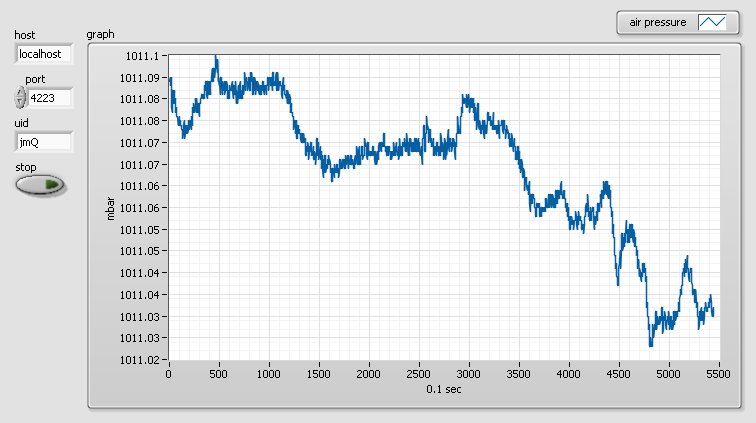
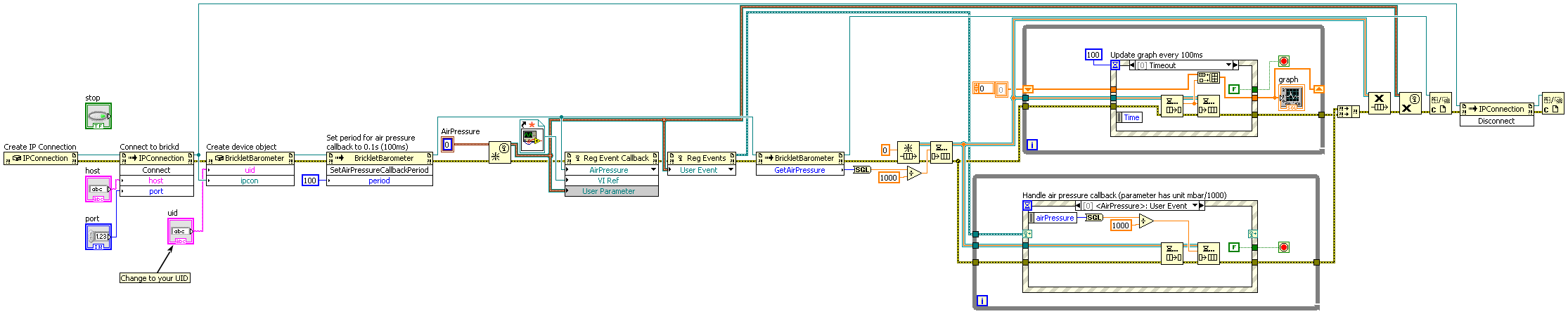
Here's an another example showing a graph of air pressure values measured by a Barometer Bricklet.
And here the corresponding block diagram:
API Reference and Examples
Links to the API reference for the IP Connection, Bricks and Bricklets as well as the examples from the ZIP file of the bindings are listed in the following table. Further project descriptions can be found in the Kits section.
Name |
API |
Examples |
|---|---|---|
Miscellaneous |
||
Bricks |
||
Bricks (Discontinued) |
||
Bricklets |
||
Bricklets (Discontinued) |
||