


- Getting Started
- Hardware
- Software
- Brick Daemon (brickd)
- Brick Viewer (brickv)
- Brick Logger
- API Bindings
- C/C++
- C/C++ (iOS)
- C/C++ for Microcontrollers
- C#
- C# (Windows Phone)
- Delphi/Lazarus
- Go
- Java
- Java (Android)
- JavaScript
- LabVIEW
- Mathematica
- MATLAB/Octave
- MQTT
- openHAB
- Perl
- PHP
- Python
- Ruby
- Rust
- Shell
- Requirements
- Installation
- Testing an Example
- API Reference and Examples
- IP Connection
- Bricks
- Bricks (Discontinued)
- Bricklets
- Bricklets (Discontinued)
- Accelerometer Bricklet
- Ambient Light Bricklet
- Ambient Light Bricklet 2.0
- Analog In Bricklet
- Analog In Bricklet 2.0
- Analog Out Bricklet
- Analog Out Bricklet 2.0
- CO2 Bricklet
- Current12 Bricklet
- Current25 Bricklet
- Distance US Bricklet
- Dual Button Bricklet
- Dual Relay Bricklet
- GPS Bricklet
- Humidity Bricklet
- Industrial Analog Out Bricklet
- Industrial Digital In 4 Bricklet
- Industrial Dual Analog In Bricklet
- Industrial Quad Relay Bricklet
- IO-4 Bricklet
- Laser Range Finder Bricklet
- LCD 16x2 Bricklet
- LED Strip Bricklet
- Load Cell Bricklet
- Moisture Bricklet
- Motion Detector Bricklet
- NFC/RFID Bricklet
- OLED 128x64 Bricklet
- Piezo Buzzer Bricklet
- PTC Bricklet
- PTC Bricklet 2.0
- Remote Switch Bricklet
- RGB LED Bricklet
- RGB LED Matrix Bricklet
- Rotary Encoder Bricklet
- Solid State Relay Bricklet
- Temperature IR Bricklet
- Thermocouple Bricklet
- UV Light Bricklet
- Voltage Bricklet
- Voltage/Current Bricklet
- Visual Basic .NET
- ESP32 Firmware
- APT Repository
- Device Identifier
- Source Code and Bug Tracking
- Programming Interface
- Kits
- Embedded Boards
- Specifications
Shell - OLED 128x64 Bricklet
This is the description of the Shell API bindings for the OLED 128x64 Bricklet. General information and technical specifications for the OLED 128x64 Bricklet are summarized in its hardware description.
An installation guide for the Shell API bindings is part of their general description.
Examples
The example code below is Public Domain (CC0 1.0).
Hello World
Download (example-hello-world.sh)
 1#!/bin/sh
 2# Connects to localhost:4223 by default, use --host and --port to change this
 3
 4uid=XYZ # Change XYZ to the UID of your OLED 128x64 Bricklet
 5
 6# Clear display
 7tinkerforge call oled-128x64-bricklet $uid clear-display
 8
 9# Write "Hello World" starting from upper left corner of the screen
10tinkerforge call oled-128x64-bricklet $uid write-line 0 0 "Hello World"
Pixel Matrix
Download (example-pixel-matrix.sh)
 1#!/bin/bash
 2# Connects to localhost:4223 by default, use --host and --port to change this
 3
 4# This example requires Bash 4
 5
 6uid=XYZ # Change XYZ to the UID of your OLED 128x64 Bricklet
 7
 8SCREEN_WIDTH=128
 9SCREEN_HEIGHT=64
10
11function draw_matrix {
12    declare -A column
13    declare -A column_write
14
15    for ((i=0; i<${SCREEN_HEIGHT}/8; i++))
16    do
17        for ((j=0; j<${SCREEN_WIDTH}; j++))
18        do
19            page=0
20
21            for ((k=0; k<8; k++))
22            do
23                if ((${pixel_matrix[$((((${i}*8))+${k})),${j}]}))
24                then
25                    page=$((${page}|$((1<<${k}))))
26                fi
27            done
28            column[${i},${j}]=${page}
29        done
30    done
31    tinkerforge call oled-128x64-bricklet ${uid} new-window 0 $((${SCREEN_WIDTH}-1)) 0 7
32
33    for ((i=0; i<${SCREEN_HEIGHT}/8; i++))
34    do
35        l=0
36        for ((j=0; j < ${SCREEN_WIDTH}/2; j++))
37        do
38            column_write[${l}]=${column[${i},${j}]}
39            l=$((l+1))
40        done
41        write_bytes=""
42        for ((j=0; j<${SCREEN_WIDTH}/2; j++))
43        do
44            write_bytes+=${column_write[${j}]}
45            if ((${j}==${SCREEN_HEIGHT}-1))
46            then
47                continue
48            fi
49            write_bytes+=","
50        done
51        tinkerforge call oled-128x64-bricklet ${uid} write ${write_bytes}
52
53        l=0
54        for ((j=${SCREEN_WIDTH}/2; j < ${SCREEN_WIDTH}; j++))
55        do
56            column_write[${l}]=${column[${i},${j}]}
57            l=$((l+1))
58        done
59
60        write_bytes=""
61        for ((j=0; j<${SCREEN_WIDTH}/2; j++))
62        do
63            write_bytes+=${column_write[${j}]}
64            if ((${j}==${SCREEN_HEIGHT}-1))
65            then
66                continue
67            fi
68            write_bytes+=","
69        done
70        tinkerforge call oled-128x64-bricklet ${uid} write ${write_bytes}
71    done
72}
73
74# Clear display
75tinkerforge call oled-128x64-bricklet $uid clear-display
76
77# Draw checkerboard pattern
78declare -A pixel_matrix
79
80for ((h=0;h<${SCREEN_HEIGHT};h++))
81do
82    for ((w=0;w<${SCREEN_WIDTH};w++))
83    do
84        pixel_matrix[${h},${w}]=$((((${h}/8))%2==((${w}/8))%2))
85    done
86done
87
88draw_matrix
API
Possible exit codes for all tinkerforge commands are:
1: interrupted (ctrl+c)
2: syntax error
21: Python 2.5 or newer is required
22: Python
argparsemodule is missing23: socket error
24: other exception
25: invalid placeholder in format string
26: authentication error
201: timeout occurred
209: invalid argument value
210: function is not supported
211: unknown error
Command Structure
The common options of the call and dispatch commands are documented
here. The specific command structure is shown below.
- tinkerforge call oled-128x64-bricklet [<option>..] <uid> <function> [<argument>..]
Parameters: - <uid> – Type: String
- <function> – Type: String
The
callcommand is used to call a function of the OLED 128x64 Bricklet. It can take several options:--helpshows help for the specificcallcommand and exits--list-functionsshows a list of known functions of the OLED 128x64 Bricklet and exits
- tinkerforge dispatch oled-128x64-bricklet [<option>..] <uid> <callback>
Parameters: - <uid> – Type: String
- <callback> – Type: String
The
dispatchcommand is used to dispatch a callback of the OLED 128x64 Bricklet. It can take several options:--helpshows help for the specificdispatchcommand and exits--list-callbacksshows a list of known callbacks of the OLED 128x64 Bricklet and exits
- tinkerforge call oled-128x64-bricklet <uid> <function> [<option>..] [<argument>..]
Parameters: - <uid> – Type: String
- <function> – Type: String
The
<function>to be called can take different options depending of its kind. All functions can take the following options:--helpshows help for the specific function and exits
Getter functions can take the following options:
--execute <command>shell command line to execute for each incoming response (see section about output formatting for details)
Setter functions can take the following options:
--expect-responserequests response and waits for it
The
--expect-responseoption for setter functions allows to detect timeouts and other error conditions calls of setters as well. The device will then send a response for this purpose. If this option is not given for a setter function then no response is sent and errors are silently ignored, because they cannot be detected.
- tinkerforge dispatch oled-128x64-bricklet <uid> <callback> [<option>..]
Parameters: - <uid> – Type: String
- <callback> – Type: String
The
<callback>to be dispatched can take several options:--helpshows help for the specific callback and exits--execute <command>shell command line to execute for each incoming response (see section about output formatting for details)
Basic Functions
- tinkerforge call oled-128x64-bricklet <uid> write <data>
Parameters: - <data> – Type: Int Array, Length: 64, Range: [0 to 255]
Output: - no output
Appends 64 byte of data to the window as set by
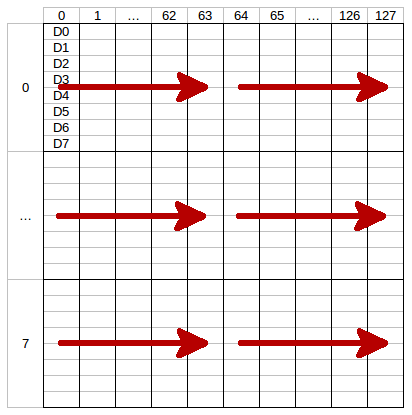
new-window.Each row has a height of 8 pixels which corresponds to one byte of data.
Example: if you call
new-windowwith column from 0 to 127 and row from 0 to 7 (the whole display) each call ofwrite(red arrow) will write half of a row.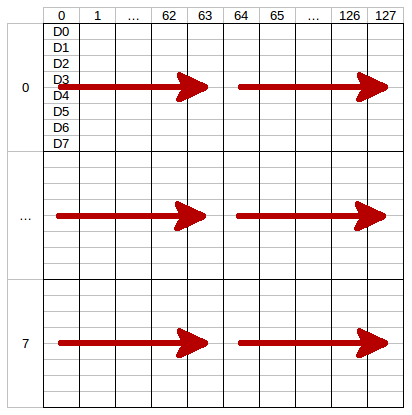
The LSB (D0) of each data byte is at the top and the MSB (D7) is at the bottom of the row.
The next call of
writewill write the second half of the row and the next two the second row and so on. To fill the whole display you need to callwrite16 times.
- tinkerforge call oled-128x64-bricklet <uid> new-window <column-from> <column-to> <row-from> <row-to>
Parameters: - <column-from> – Type: Int, Range: [0 to 127]
- <column-to> – Type: Int, Range: [0 to 127]
- <row-from> – Type: Int, Range: [0 to 7]
- <row-to> – Type: Int, Range: [0 to 7]
Output: - no output
Sets the window in which you can write with
write. One row has a height of 8 pixels.
- tinkerforge call oled-128x64-bricklet <uid> clear-display
Output: - no output
Clears the current content of the window as set by
new-window.
- tinkerforge call oled-128x64-bricklet <uid> write-line <line> <position> <text>
Parameters: - <line> – Type: Int, Range: [0 to 7]
- <position> – Type: Int, Range: [0 to 25]
- <text> – Type: String, Length: up to 26
Output: - no output
Writes text to a specific line with a specific position. The text can have a maximum of 26 characters.
For example: (1, 10, "Hello") will write Hello in the middle of the second line of the display.
You can draw to the display with
writeand then add text to it afterwards.The display uses a special 5x7 pixel charset. You can view the characters of the charset in Brick Viewer.
The font conforms to code page 437.
Advanced Functions
- tinkerforge call oled-128x64-bricklet <uid> set-display-configuration <contrast> <invert>
Parameters: - <contrast> – Type: Int, Range: [0 to 255], Default: 143
- <invert> – Type: Bool, Default: false
Output: - no output
Sets the configuration of the display.
You can set a contrast value from 0 to 255 and you can invert the color (black/white) of the display.
- tinkerforge call oled-128x64-bricklet <uid> get-display-configuration
Output: - contrast – Type: Int, Range: [0 to 255], Default: 143
- invert – Type: Bool, Default: false
Returns the configuration as set by
set-display-configuration.
- tinkerforge call oled-128x64-bricklet <uid> get-identity
Output: - uid – Type: String, Length: up to 8
- connected-uid – Type: String, Length: up to 8
- position – Type: Char, Range: [a to h, z]
- hardware-version – Type: Int Array, Length: 3
- 0: major – Type: Int, Range: [0 to 255]
- 1: minor – Type: Int, Range: [0 to 255]
- 2: revision – Type: Int, Range: [0 to 255]
- firmware-version – Type: Int Array, Length: 3
- 0: major – Type: Int, Range: [0 to 255]
- 1: minor – Type: Int, Range: [0 to 255]
- 2: revision – Type: Int, Range: [0 to 255]
- device-identifier – Type: Int, Range: [0 to 216 - 1]
Returns the UID, the UID where the Bricklet is connected to, the position, the hardware and firmware version as well as the device identifier.
The position can be 'a', 'b', 'c', 'd', 'e', 'f', 'g' or 'h' (Bricklet Port). A Bricklet connected to an Isolator Bricklet is always at position 'z'.
The device identifier numbers can be found here.