


- Getting Started
- Hardware
- Software
- Brick Daemon (brickd)
- Brick Viewer (brickv)
- Brick Logger
- API Bindings
- C/C++
- C/C++ (iOS)
- C/C++ for Microcontrollers
- C#
- C# (Windows Phone)
- Delphi/Lazarus
- Go
- Java
- Java (Android)
- JavaScript
- LabVIEW
- Mathematica
- MATLAB/Octave
- Requirements
- Installation
- Testing an Example
- Known Issues
- API Reference and Examples
- IP Connection
- Bricks
- Bricks (Discontinued)
- Bricklets
- Accelerometer Bricklet 2.0
- Air Quality Bricklet
- Ambient Light Bricklet 3.0
- Analog In Bricklet 3.0
- Analog Out Bricklet 3.0
- Barometer Bricklet
- Barometer Bricklet 2.0
- CAN Bricklet
- CAN Bricklet 2.0
- CO2 Bricklet 2.0
- Color Bricklet
- Color Bricklet 2.0
- Compass Bricklet
- DC Bricklet 2.0
- Distance IR Bricklet
- Distance IR Bricklet 2.0
- Distance US Bricklet 2.0
- DMX Bricklet
- Dual Button Bricklet 2.0
- Dust Detector Bricklet
- E-Paper 296x128 Bricklet
- Energy Monitor Bricklet
- GPS Bricklet 2.0
- GPS Bricklet 3.0
- Hall Effect Bricklet
- Hall Effect Bricklet 2.0
- Humidity Bricklet 2.0
- IMU Bricklet 3.0
- Industrial Analog Out Bricklet 2.0
- Industrial Counter Bricklet
- Industrial Digital In 4 Bricklet 2.0
- Industrial Digital Out 4 Bricklet
- Industrial Digital Out 4 Bricklet 2.0
- Industrial Dual 0-20mA Bricklet
- Industrial Dual 0-20mA Bricklet 2.0
- Industrial Dual AC In Bricklet
- Industrial Dual AC Relay Bricklet
- Industrial Dual Analog In Bricklet 2.0
- Industrial Dual Relay Bricklet
- Industrial PTC Bricklet
- Industrial Quad Relay Bricklet 2.0
- IO-16 Bricklet
- IO-16 Bricklet 2.0
- IO-4 Bricklet 2.0
- Isolator Bricklet
- Joystick Bricklet
- Joystick Bricklet 2.0
- Laser Range Finder Bricklet 2.0
- LCD 128x64 Bricklet
- LCD 20x4 Bricklet
- LED Strip Bricklet 2.0
- Line Bricklet
- Linear Poti Bricklet
- Linear Poti Bricklet 2.0
- Load Cell Bricklet 2.0
- Motion Detector Bricklet 2.0
- Motorized Linear Poti Bricklet
- Multi Touch Bricklet
- Multi Touch Bricklet 2.0
- NFC Bricklet
- OLED 128x64 Bricklet 2.0
- OLED 64x48 Bricklet
- One Wire Bricklet
- Outdoor Weather Bricklet
- Particulate Matter Bricklet
- Performance DC Bricklet
- Piezo Speaker Bricklet
- Piezo Speaker Bricklet 2.0
- Real-Time Clock Bricklet
- Real-Time Clock Bricklet 2.0
- Remote Switch Bricklet 2.0
- RGB LED Bricklet 2.0
- RGB LED Button Bricklet
- Rotary Encoder Bricklet 2.0
- Rotary Poti Bricklet
- Rotary Poti Bricklet 2.0
- RS232 Bricklet
- RS232 Bricklet 2.0
- RS485 Bricklet
- Segment Display 4x7 Bricklet
- Segment Display 4x7 Bricklet 2.0
- Servo Bricklet 2.0
- Silent Stepper Bricklet 2.0
- Solid State Relay Bricklet 2.0
- Sound Intensity Bricklet
- Sound Pressure Level Bricklet
- Temperature Bricklet
- Temperature Bricklet 2.0
- Temperature IR Bricklet 2.0
- Thermal Imaging Bricklet
- Thermocouple Bricklet 2.0
- Tilt Bricklet
- UV Light Bricklet 2.0
- Voltage/Current Bricklet 2.0
- XMC1400 Breakout Bricklet
- Bricklets (Discontinued)
- MQTT
- openHAB
- Perl
- PHP
- Python
- Ruby
- Rust
- Shell
- Visual Basic .NET
- ESP32 Firmware
- APT Repository
- Device Identifier
- Source Code and Bug Tracking
- Programming Interface
- Kits
- Embedded Boards
- Specifications
MATLAB/Octave - OLED 64x48 Bricklet
This is the description of the MATLAB/Octave API bindings for the OLED 64x48 Bricklet. General information and technical specifications for the OLED 64x48 Bricklet are summarized in its hardware description.
An installation guide for the MATLAB/Octave API bindings is part of their general description.
Examples
The example code below is Public Domain (CC0 1.0).
Hello World (MATLAB)
Download (matlab_example_hello_world.m)
 1function matlab_example_hello_world()
 2    import com.tinkerforge.IPConnection;
 3    import com.tinkerforge.BrickletOLED64x48;
 4
 5    HOST = 'localhost';
 6    PORT = 4223;
 7    UID = 'XYZ'; % Change XYZ to the UID of your OLED 64x48 Bricklet
 8
 9    ipcon = IPConnection(); % Create IP connection
10    oled = handle(BrickletOLED64x48(UID, ipcon), 'CallbackProperties'); % Create device object
11
12    ipcon.connect(HOST, PORT); % Connect to brickd
13    % Don't use device before ipcon is connected
14
15    % Clear display
16    oled.clearDisplay();
17
18    % Write "Hello World" starting from upper left corner of the screen
19    oled.writeLine(0, 0, 'Hello World');
20
21    input('Press key to exit\n', 's');
22    ipcon.disconnect();
23end
Pixel Matrix (MATLAB)
Download (matlab_example_pixel_matrix.m)
 1function matlab_example_pixel_matrix()
 2    import com.tinkerforge.IPConnection;
 3    import com.tinkerforge.BrickletOLED64x48;
 4
 5    HOST = 'localhost';
 6    PORT = 4223;
 7    UID = 'XYZ'; % Change XYZ to the UID of your OLED 64x48 Bricklet
 8    SCREEN_WIDTH = 64;
 9    SCREEN_HEIGHT = 48;
10
11    function draw_matrix(oled, pixels)
12        column = cell(1, SCREEN_HEIGHT/8);
13        for i = 1:(SCREEN_HEIGHT/8) - 1
14            column{i} = zeros(1, 64);
15            for j = 1:SCREEN_WIDTH
16                page = 0;
17                for k = 0:7
18                    if pixels(i*8 + k, j) == true
19                        page = bitor(page, bitshift(1, k));
20                    end
21                end
22                column{i}(j) = page;
23            end
24        end
25        oled.newWindow(0, SCREEN_WIDTH-1, 0, 5);
26        for i = 1:(SCREEN_HEIGHT/8) - 1
27            oled.write(column{i});
28        end
29    end
30
31    ipcon = IPConnection(); % Create IP connection
32    oled = handle(BrickletOLED64x48(UID, ipcon), 'CallbackProperties'); % Create device object
33
34    ipcon.connect(HOST, PORT); % Connect to brickd
35    % Don't use device before ipcon is connected
36
37    % Clear display
38    oled.clearDisplay();
39
40    % Draw checkerboard pattern
41    pixel_matrix = false(SCREEN_HEIGHT, SCREEN_WIDTH);
42
43    for h = 1:SCREEN_HEIGHT
44        for w = 1:SCREEN_WIDTH
45            pixel_matrix(h, w) = mod(floor(h / 8), 2) == mod(floor(w / 8), 2);
46        end
47    end
48
49    draw_matrix(oled, pixel_matrix);
50
51    input('Press key to exit\n', 's');
52    ipcon.disconnect();
53end
Hello World (Octave)
Download (octave_example_hello_world.m)
 1function octave_example_hello_world()
 2    more off;
 3
 4    HOST = "localhost";
 5    PORT = 4223;
 6    UID = "XYZ"; % Change XYZ to the UID of your OLED 64x48 Bricklet
 7
 8    ipcon = javaObject("com.tinkerforge.IPConnection"); % Create IP connection
 9    oled = javaObject("com.tinkerforge.BrickletOLED64x48", UID, ipcon); % Create device object
10
11    ipcon.connect(HOST, PORT); % Connect to brickd
12    % Don't use device before ipcon is connected
13
14    % Clear display
15    oled.clearDisplay();
16
17    % Write "Hello World" starting from upper left corner of the screen
18    oled.writeLine(0, 0, "Hello World");
19
20    input("Press key to exit\n", "s");
21    ipcon.disconnect();
22end
Pixel Matrix (Octave)
Download (octave_example_pixel_matrix.m)
 1function octave_example_pixel_matrix()
 2    more off;
 3
 4    HOST = "localhost";
 5    PORT = 4223;
 6    UID = "XYZ"; % Change XYZ to the UID of your OLED 64x48 Bricklet
 7    SCREEN_WIDTH = 64;
 8    SCREEN_HEIGHT = 48;
 9
10    function draw_matrix(oled, pixels)
11        SCREEN_WIDTH = 64;
12        SCREEN_HEIGHT = 48;
13        column = cell(1, SCREEN_HEIGHT/8);
14        for i = 1:(SCREEN_HEIGHT/8) - 1
15            column{i} = zeros(1, 64);
16            for j = 1:SCREEN_WIDTH
17                page = 0;
18                for k = 0:7
19                    if pixels(i*8 + k, j) == true
20                        page = bitor(page, bitshift(1, k));
21                    end
22                end
23                column{i}(j) = page;
24            end
25        end
26        oled.newWindow(0, SCREEN_WIDTH-1, 0, 5);
27        for i = 1:(SCREEN_HEIGHT/8) - 1
28            oled.write(column{i});
29        end
30    end
31
32    ipcon = javaObject("com.tinkerforge.IPConnection"); % Create IP connection
33    oled = javaObject("com.tinkerforge.BrickletOLED64x48", UID, ipcon); % Create device object
34
35    ipcon.connect(HOST, PORT); % Connect to brickd
36    % Don't use device before ipcon is connected
37
38    % Clear display
39    oled.clearDisplay();
40
41    % Draw checkerboard pattern
42    pixel_matrix = false(SCREEN_HEIGHT, SCREEN_WIDTH);
43
44    for h = 1:SCREEN_HEIGHT
45        for w = 1:SCREEN_WIDTH
46            pixel_matrix(h, w) = mod(floor(h / 8), 2) == mod(floor(w / 8), 2);
47        end
48    end
49
50    draw_matrix(oled, pixel_matrix);
51
52    input("Press key to exit\n", "s");
53    ipcon.disconnect();
54end
API
Generally, every method of the MATLAB bindings that returns a value can
throw a TimeoutException. This exception gets thrown if the
device did not respond. If a cable based connection is used, it is
unlikely that this exception gets thrown (assuming nobody unplugs the
device). However, if a wireless connection is used, timeouts will occur
if the distance to the device gets too big.
Beside the TimeoutException there is also a NotConnectedException that
is thrown if a method needs to communicate with the device while the
IP Connection is not connected.
Since the MATLAB bindings are based on Java and Java does not support multiple return values and return by reference is not possible for primitive types, we use small classes that only consist of member variables. The member variables of the returned objects are described in the corresponding method descriptions.
The package for all Brick/Bricklet bindings and the IP Connection is
com.tinkerforge.*
All methods listed below are thread-safe.
Basic Functions
- class BrickletOLED64x48(String uid, IPConnection ipcon)
Parameters: - uid – Type: String
- ipcon – Type: IPConnection
Returns: - oled64x48 – Type: BrickletOLED64x48
Creates an object with the unique device ID
uid.In MATLAB:
import com.tinkerforge.BrickletOLED64x48;

oled64x48 = BrickletOLED64x48('YOUR_DEVICE_UID', ipcon);
In Octave:
oled64x48 = java_new("com.tinkerforge.BrickletOLED64x48", "YOUR_DEVICE_UID", ipcon);
This object can then be used after the IP Connection is connected.
- void BrickletOLED64x48.write(short[] data)
Parameters: - data – Type: short[], Length: 64, Range: [0 to 255]
Appends 64 byte of data to the window as set by
newWindow().Each row has a height of 8 pixels which corresponds to one byte of data.
Example: if you call
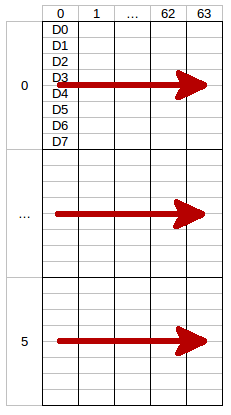
newWindow()with column from 0 to 63 and row from 0 to 5 (the whole display) each call ofwrite()(red arrow) will write one row.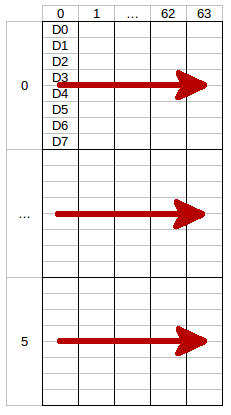
The LSB (D0) of each data byte is at the top and the MSB (D7) is at the bottom of the row.
The next call of
write()will write the second row and so on. To fill the whole display you need to callwrite()6 times.
- void BrickletOLED64x48.newWindow(short columnFrom, short columnTo, short rowFrom, short rowTo)
Parameters: - columnFrom – Type: short, Range: [0 to 63]
- columnTo – Type: short, Range: [0 to 63]
- rowFrom – Type: short, Range: [0 to 5]
- rowTo – Type: short, Range: [0 to 5]
Sets the window in which you can write with
write(). One row has a height of 8 pixels.
- void BrickletOLED64x48.clearDisplay()
Clears the current content of the window as set by
newWindow().
- void BrickletOLED64x48.writeLine(short line, short position, String text)
Parameters: - line – Type: short, Range: [0 to 5]
- position – Type: short, Range: [0 to 12]
- text – Type: String, Length: up to 13
Writes text to a specific line with a specific position. The text can have a maximum of 13 characters.
For example: (1, 4, "Hello") will write Hello in the middle of the second line of the display.
You can draw to the display with
write()and then add text to it afterwards.The display uses a special 5x7 pixel charset. You can view the characters of the charset in Brick Viewer.
The font conforms to code page 437.
Advanced Functions
- void BrickletOLED64x48.setDisplayConfiguration(short contrast, boolean invert)
Parameters: - contrast – Type: short, Range: [0 to 255], Default: 143
- invert – Type: boolean, Default: false
Sets the configuration of the display.
You can set a contrast value from 0 to 255 and you can invert the color (black/white) of the display.
- BrickletOLED64x48.DisplayConfiguration BrickletOLED64x48.getDisplayConfiguration()
Return Object: - contrast – Type: short, Range: [0 to 255], Default: 143
- invert – Type: boolean, Default: false
Returns the configuration as set by
setDisplayConfiguration().
- BrickletOLED64x48.Identity BrickletOLED64x48.getIdentity()
Return Object: - uid – Type: String, Length: up to 8
- connectedUid – Type: String, Length: up to 8
- position – Type: char, Range: ['a' to 'h', 'z']
- hardwareVersion – Type: short[], Length: 3
- 1: major – Type: short, Range: [0 to 255]
- 2: minor – Type: short, Range: [0 to 255]
- 3: revision – Type: short, Range: [0 to 255]
- firmwareVersion – Type: short[], Length: 3
- 1: major – Type: short, Range: [0 to 255]
- 2: minor – Type: short, Range: [0 to 255]
- 3: revision – Type: short, Range: [0 to 255]
- deviceIdentifier – Type: int, Range: [0 to 216 - 1]
Returns the UID, the UID where the Bricklet is connected to, the position, the hardware and firmware version as well as the device identifier.
The position can be 'a', 'b', 'c', 'd', 'e', 'f', 'g' or 'h' (Bricklet Port). A Bricklet connected to an Isolator Bricklet is always at position 'z'.
The device identifier numbers can be found here. There is also a constant for the device identifier of this Bricklet.
Virtual Functions
Virtual functions don't communicate with the device itself, but operate only on the API bindings device object. They can be called without the corresponding IP Connection object being connected.
- short[] BrickletOLED64x48.getAPIVersion()
Return Object: - apiVersion – Type: short[], Length: 3
- 1: major – Type: short, Range: [0 to 255]
- 2: minor – Type: short, Range: [0 to 255]
- 3: revision – Type: short, Range: [0 to 255]
Returns the version of the API definition implemented by this API bindings. This is neither the release version of this API bindings nor does it tell you anything about the represented Brick or Bricklet.
- boolean BrickletOLED64x48.getResponseExpected(byte functionId)
Parameters: - functionId – Type: byte, Range: See constants
Returns: - responseExpected – Type: boolean
Returns the response expected flag for the function specified by the function ID parameter. It is true if the function is expected to send a response, false otherwise.
For getter functions this is enabled by default and cannot be disabled, because those functions will always send a response. For callback configuration functions it is enabled by default too, but can be disabled by
setResponseExpected(). For setter functions it is disabled by default and can be enabled.Enabling the response expected flag for a setter function allows to detect timeouts and other error conditions calls of this setter as well. The device will then send a response for this purpose. If this flag is disabled for a setter function then no response is sent and errors are silently ignored, because they cannot be detected.
The following constants are available for this function:
For functionId:
BrickletOLED64x48.FUNCTION_WRITE = 1
BrickletOLED64x48.FUNCTION_NEW_WINDOW = 2
BrickletOLED64x48.FUNCTION_CLEAR_DISPLAY = 3
BrickletOLED64x48.FUNCTION_SET_DISPLAY_CONFIGURATION = 4
BrickletOLED64x48.FUNCTION_WRITE_LINE = 6
- void BrickletOLED64x48.setResponseExpected(byte functionId, boolean responseExpected)
Parameters: - functionId – Type: byte, Range: See constants
- responseExpected – Type: boolean
Changes the response expected flag of the function specified by the function ID parameter. This flag can only be changed for setter (default value: false) and callback configuration functions (default value: true). For getter functions it is always enabled.
Enabling the response expected flag for a setter function allows to detect timeouts and other error conditions calls of this setter as well. The device will then send a response for this purpose. If this flag is disabled for a setter function then no response is sent and errors are silently ignored, because they cannot be detected.
The following constants are available for this function:
For functionId:
BrickletOLED64x48.FUNCTION_WRITE = 1
BrickletOLED64x48.FUNCTION_NEW_WINDOW = 2
BrickletOLED64x48.FUNCTION_CLEAR_DISPLAY = 3
BrickletOLED64x48.FUNCTION_SET_DISPLAY_CONFIGURATION = 4
BrickletOLED64x48.FUNCTION_WRITE_LINE = 6
- void BrickletOLED64x48.setResponseExpectedAll(boolean responseExpected)
Parameters: - responseExpected – Type: boolean
Changes the response expected flag for all setter and callback configuration functions of this device at once.
Constants
- int BrickletOLED64x48.DEVICE_IDENTIFIER
This constant is used to identify a OLED 64x48 Bricklet.
The
getIdentity()function and theIPConnection.EnumerateCallbackcallback of the IP Connection have adeviceIdentifierparameter to specify the Brick's or Bricklet's type.
- String BrickletOLED64x48.DEVICE_DISPLAY_NAME
This constant represents the human readable name of a OLED 64x48 Bricklet.