


Modbus Protokoll
This is the API description for the Modbus RTU protocol of the RS485 Extension.
An overview of products that are controllable over Modbus can be found here.
Protocol
The RS485 Extension uses Modbus RTU as the protocol on the RS485 interface.
High level configurations, such as baud rate, parity and stop bits can be done with the Brick Viewer and are stored on the EEPROM of the RS485 extension.
The protocol used on the RS485 Extension is modeled after the concept of a function call. A request packet is send by the RS485 master to the stack with RS485 Extension to trigger the execution of a function on a selected Brick or Bricklet. The stack answers with either a response (which can be the response of an older function call, a response to this function call or a callback) or a packet with an empty payload. If the answer by the RS485 slave was not empty, the RS485 master has to send an empty packet back (ACK).
Packet Layout
The Modbus protocol is based on packets transfered between a RS485 master and potentially many RS485 Slaves. Each packet consists of:
Modbus address as uint8 (1 byte),
Modbus function code as uint8 (1 byte),
Sequence number as uint8 (1 byte),
Payload (including UID, function ID, etc) and
Modbus CRC16 as uint16 (2 bytes)
The Modbus address is the address, that is stored in the EEPROM of the RS485 extension. It can be set with the Brick Viewer an it should be between 1 and 255. A message to a stack and responses from this stack will use this Modbus address.
As the Modbus function we use the public function code 100 in all packets (see Modbus Application Protocol V1.1b chapter 5 "Function Code Categories").
The Sequence number is incremented by the RS485 master and it is used to make sure that every request gets a response.
The Payload is a request or response packet as specified in the TCP/IP protocol.
Last but not least, the Modbus CRC16 is calculated for every packet, as specified in the Modbus RTU specification.
All data is represented in little endian. A bool value is represented by 1 byte; 0 is false, all other values are true. A float value is represented by 4 bytes in IEEE 754 format. A char value is represented by 1 byte in ASCII encoding.
A fixed size char array represents a string. If the string is shorter than the capacity of the array then the remaining space is filled with 0. In this case the contained string is null-terminated. In case that the string fills the whole array no null-terminator can be appended and the string is not null-terminated. Therefore, you cannot rely on strings being null-terminated.
Requests and Responses
In general, every time the RS485 master sends something to a slave (either with or without payload), the slave will answer (again either with or without payload) and the master has to answer again if the answer of the slave had a payload. After this whole process, the RS485 master increments the sequence number.
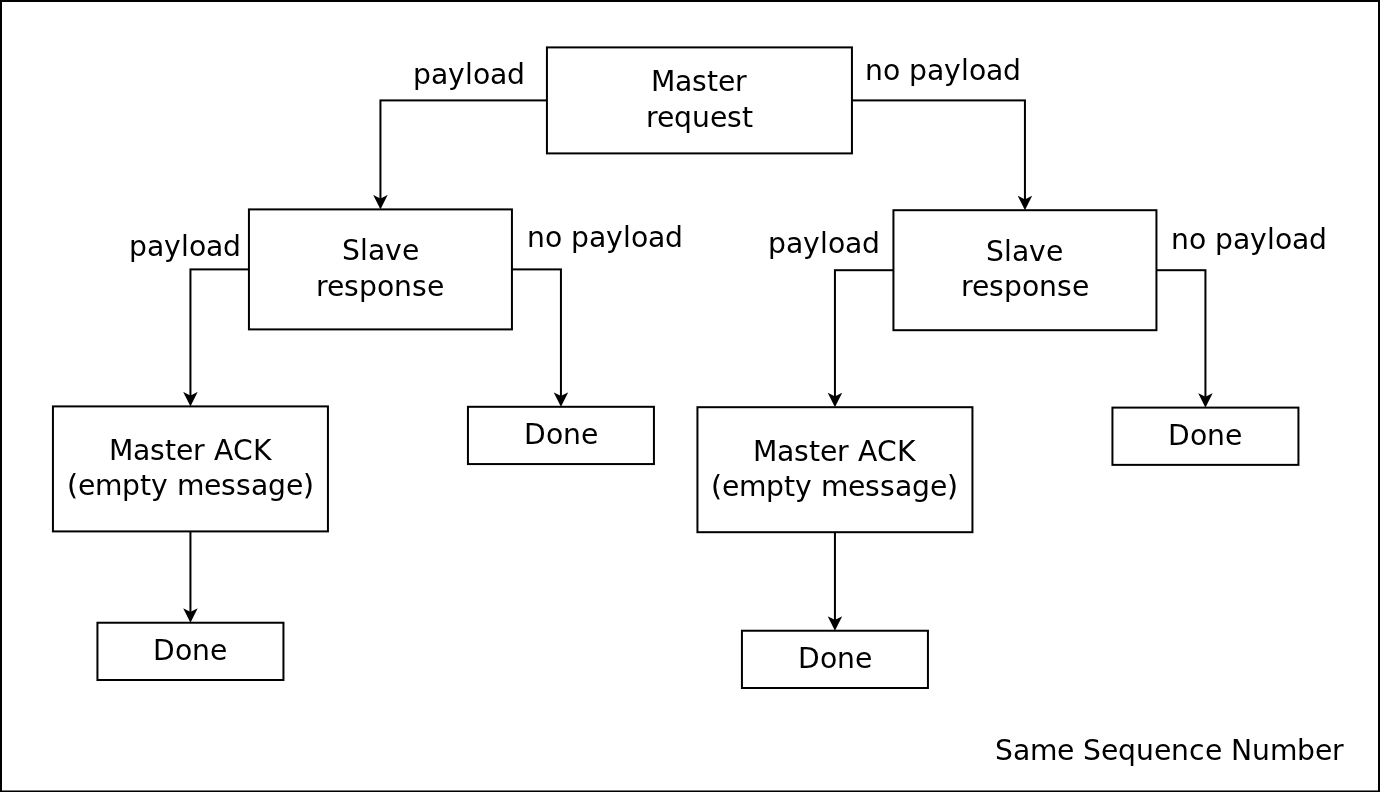
If something goes wrong in the whole process (e.g. CRC wrong, buffer full, packet length doesn't fit etc): The slave will stop responding and induce a timeout. In this case the RS485 master has to resend the request with the same sequence number.
If the RS485 master receives a response with wrong CRC or similar, he also has to resend the request with the same sequence number again.
Otherwise (everything went okay), the sequence number is incremented by the RS485 master. This approach ensures that there is never a request or response lost in the whole process.
Please note: If the RS485 master calls a function of a Brick or Bricklet in a RS485 slave stack, the response by the slave will likely not be the response to the function call. It will either be an empty message (ACK) or it will be a response to another function call from before or it will be a callback.
The approach should be that you poll every slave regularly (e.g. once per ms) with either an empty request if you have no data to transfer or with a request with payload if you have data to transfer. This will ensure that no messages pile up in the RS485 slave stack and you will get the responses to function calls and callbacks with a reasonable latency.
API
Links zur API Referenz der Bricks und Bricklets sind in der folgenden Tabelle aufgelistet. Anleitungen für weiterführende Projekte finden sich im Abschnitt über Kits.
API |
|
|---|---|
Bricks |
|
Bricklets |
|